🧠 Daily Notion Entries
Each class, you are expected to complete a short Notion portfolio entry that tracks your progress, learning, and reflection. These posts act as your digital portfolio, showing not just what you created, but how you got there.
Your entries will help document your growth across all stages of the design process — from early experimentation to final products. They also provide me with detailed evidence of your learning and progress when I evaluate your KTCA marks.
💬 Why We’re Doing This
Your Notion portfolio is where you show your process, not just the end result.
When you upload screenshots, describe techniques, explain choices, and reflect on challenges, you are:
-
Building evidence for your Knowledge, Thinking, Communication, and Application marks
-
Practicing self-reflection, which is a key part of real creative work
-
Helping me see your effort, creativity, and problem-solving process — not just your final submission
-
Developing the skill of documenting your learning, which is essential for any creative career or digital portfolio
A well-documented process can raise your overall grade, even if your final product isn’t perfect.
📝 What Each Entry Should Include
Use the following template for every class post. You can copy it from the “Mod 1 Daily Entry Template” or duplicate a previous post.
1. # Progress
-
Write in full sentences about what you did or learned today
-
Describe the tools and techniques you used and why you used them
-
Include screenshots or images of your work by typing
-
Mention any design choices or revisions you made
2. # Questions
-
Ask specific questions about techniques, tools, or problems you encountered
-
Example: “What’s the best way to make my text glow softly?” instead of “Does this look good?”
-
Tag @David Jones so I can reply directly to your post
3. # Learning
-
Reflect on what you learned today or what you improved on
-
Add your Learning Goal tags (e.g., LG1, LG2) to connect your progress to course expectations
4. # File Upload
-
Always upload your most recent project file (e.g.,
.PSD,.AI,.STL,.MP4) -
Even if your project isn’t finished, upload your current version so your progress is saved and backed up
5. # Peer Feedback (TAG Format)
-
Include feedback you received from a peer in TAG format:
-
Tell something you liked about their work
-
Ask a thoughtful question about a tool, effect, or technique
-
Give one suggestion for improvement
-
-
Include both the feedback you received and how you plan to use it to improve your work
📅 How Feedback Works
Unless there are extenuating circumstances, I will check and leave feedback on your entries every day.
This means that:
-
If you miss an entry and go back to add it later, I won’t automatically see it.
-
If you update or change an older post after I’ve already marked it, I also won’t be notified of that change.
If you make a change to an old entry or add something new after the expected time, please tag me directly in your post using @David Jones to let me know you’ve made an update.
This ensures I can go back and review the change or give feedback as needed.
🌟 Example Entry
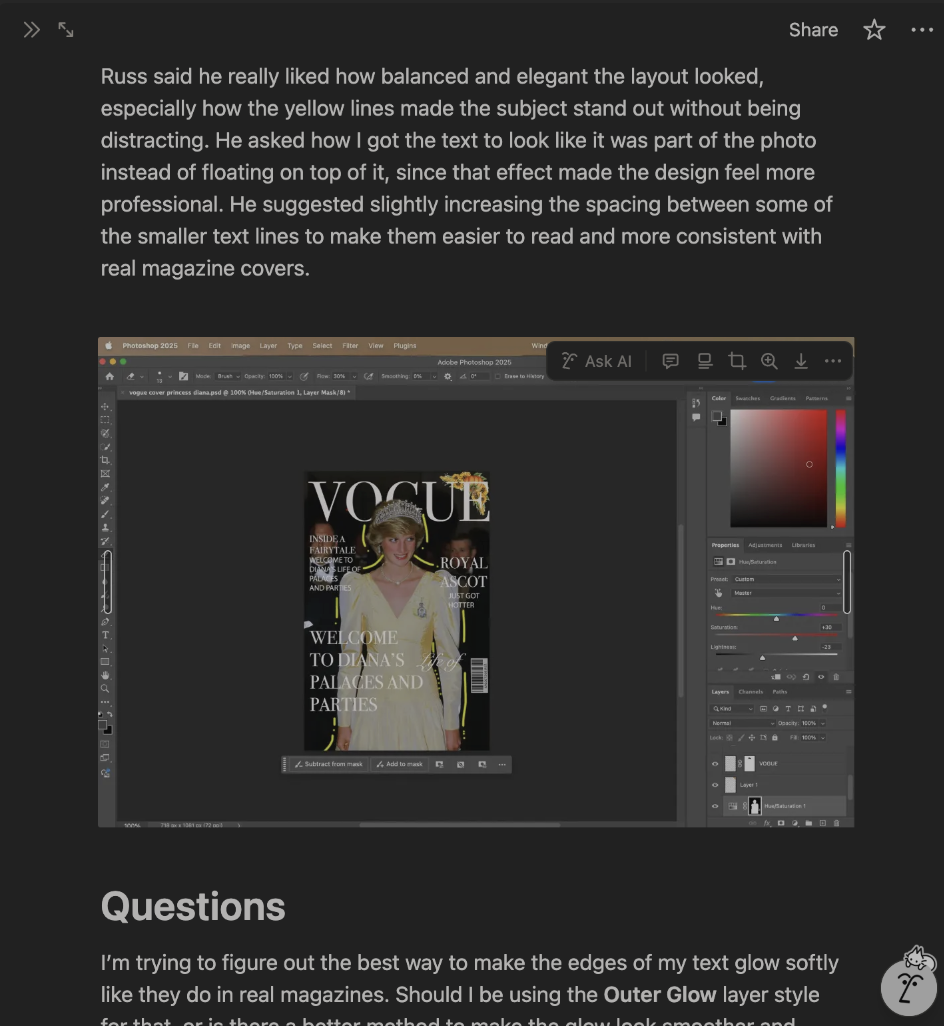
Below is an example of what an excellent Notion entry looks like.
It includes detailed explanations, images, and specific questions about tools and techniques.
Use this as a model for your own posts.
✅ Tips for Success
-
Avoid one-sentence answers — explain your process and reasoning
-
Be honest about what went well and what didn’t. Mistakes are part of learning
-
The more detail you include, the easier it is for me to understand your growth and give meaningful feedback
-
Consistency is key: aim to complete an entry after every class while your progress is still fresh
-
If you ever fall behind or update an older entry, tag @David Jones to ensure I see the change